Who it's for
Log yard software for several vans, run from one desk.
For the yard with two or more vans, where the person in the office is also the one who decides who goes where, and the phone never stops.
When the office is the bottleneck.
A yard with several vans has a different problem from a one-wagon round. Taking orders isn't the hard part now. The hard part is that every question goes through one person: whose run is this, which van has the tail lift, is the loader ready.
Multi-van firewood delivery gets easier when the answers are written down once. You set up your drivers and vans, and after that a run is a date, a driver and a van.
Delivery runs for several drivers, counted for you.
The counting should be done for you, not added to your day.
Trip numbers
They count up by themselves for each driver each day, so a driver's first, second and third run are numbered without anyone writing them down.
Run codes
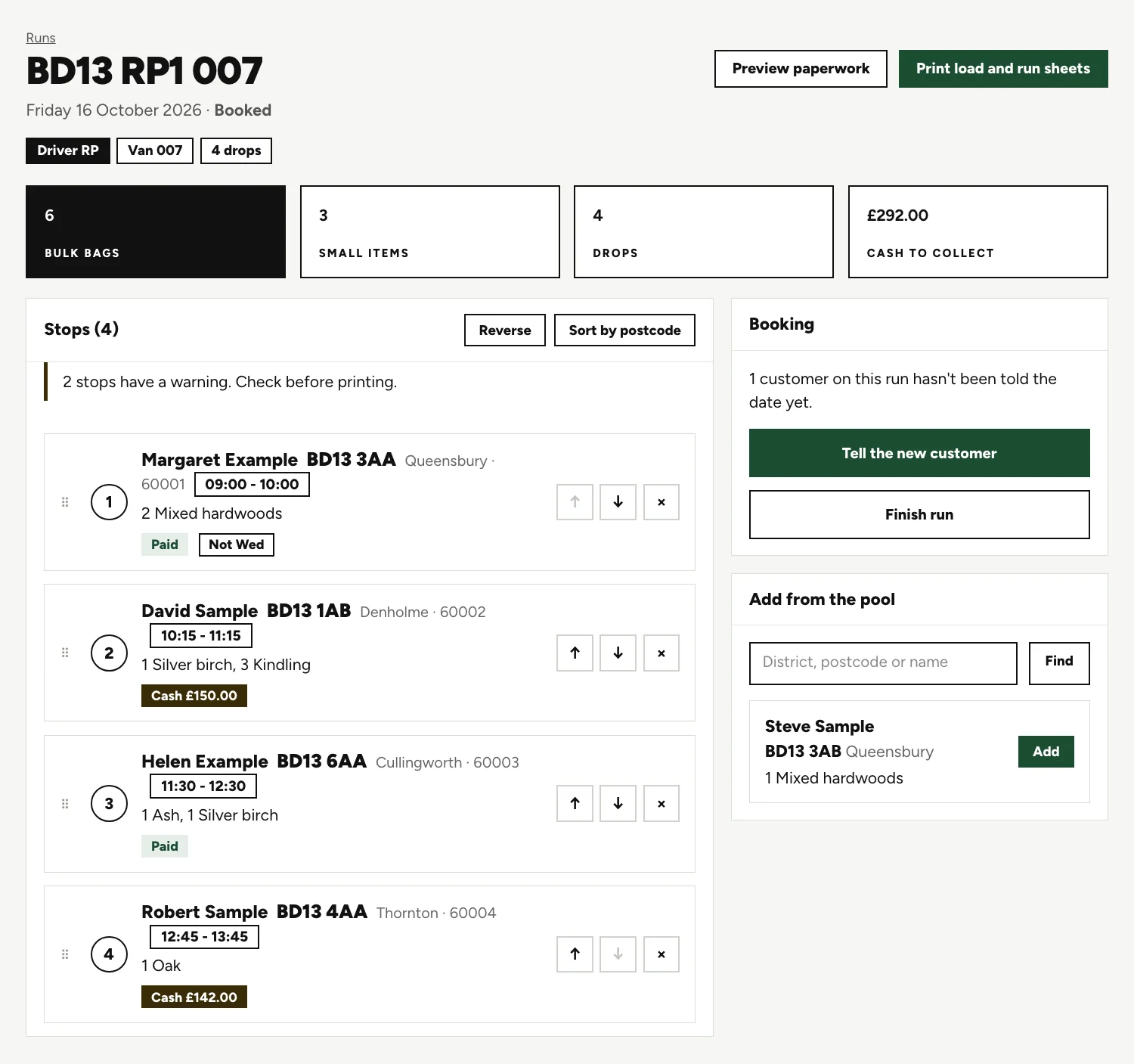
Generated for each run, so nobody invents a name on the day. The code in the screen below belongs to driver RP and van 007.
Copy a run
Build a regular round once. Copying it gives you a new draft that keeps the area label and the driver.
Every run in view
The office can open any run, past or coming, not just today's.
One run, and its warnings.
A booked run page, before the paperwork goes to the printer.
Driver, van and totals
Four drops, with bulk bags, small items and cash to collect added up.
Badges on each stop
Time windows, Paid, Cash and Not Wed sit on the stop they belong to.
The warning bar
A customer who can't take Wednesdays is marked, and the run warns you if they end up on one. Check before printing.
An example (invented, not a real yard)
Three runs on a Friday.
At an invented yard, Sam and Priya drive and Marek loads. Sam has two runs today, so they come up as Sam's first and second. Priya has one, copied by Hannah in the office from last week's round.
Marek opens the day sheet. One column per run, one row per product. He stacks the ash for Sam's first run without asking anyone what is on it.
From the whiteboard to a list of runs.
Many yards start with a whiteboard and a phone. Both are quick, and everyone can see the board from across the yard.
Whiteboard and phone
- Today is on the board, tomorrow is in someone's memory
- Drivers ring in for the next address
- The loader asks who is going where
A run for each van
- Every run listed, past and coming
- A day sheet with a column per run
- Paper in the cab with the next stop on it
A list of runs earns its place when the day stops fitting on the board.
Drivers get paper.
Drivers don't log in. The run sheet goes in the cab on paper, and the load sheet stays with the loader. There's no live map of the vans, and LogRun doesn't choose the order of stops for you. You drag them, or sort by postcode.
If you'd like text messages to customers, or a route planner on the driver's side, we can add them for your yard.
Questions people ask.
Do my drivers need to log in?
No. Drivers carry paper, so there's nothing for them to install or sign in to. Customers with an email hear from the office.
How are trip numbers worked out?
For each driver each day. A driver's first run is trip one, the next is trip two, and so on. Nobody types them.
Can the loader see the whole day at once?
Yes. The yard day sheet has a row for each product and a column for each run, with totals, so the loader sees everything going out and which run it rides on. The yard can print it.
Does it choose which van goes where?
No. You choose the driver and van for each run and group orders by area and postcode. It doesn't plan routes or check what a van can hold.
What if an order is altered once the sheets are printed?
The run is flagged as changed since printed. That tells the office to run the paperwork off again before the van leaves.
Keep reading.
Want to see it run on your yard?
Tell us how you take orders and run your deliveries today. We'll show you LogRun working on a yard like yours, and tell you honestly if it isn't the right fit.