A log delivery route planner that plans by area and postcode.
If you want software that finds the shortest loop, this isn't it. If you want runs built by area, ordered by you and printed for the driver, read on.
What this is, and what it isn't.
A log delivery route planner usually means a tool that works out the quickest order for your stops. LogRun isn't that. It builds runs by delivery area and postcode, and it isn't an optimiser.
Your office puts the stops in order by dragging them, or by clicking sort by postcode once. The driver then uses the sat nav or maps app they already trust for the last mile.
We say it early because you'll wonder. You know which gate sticks and which hill the wagon dislikes, and the person who knows should decide the order.
How to plan deliveries by postcode, in four steps.
Tick the orders
In the pool, tick the orders for one area. They're already grouped and sorted by postcode, so neighbours sit together.
Pick day, driver and van
Choose the date, the driver and the van, then make the run. The run code and trip number appear by themselves.
Put the stops in order
Drag them, or sort by postcode with one click. Reverse flips the lot if you'd rather start at the far end.
Book it
Booking the run emails every customer who has an email address, with their delivery day.
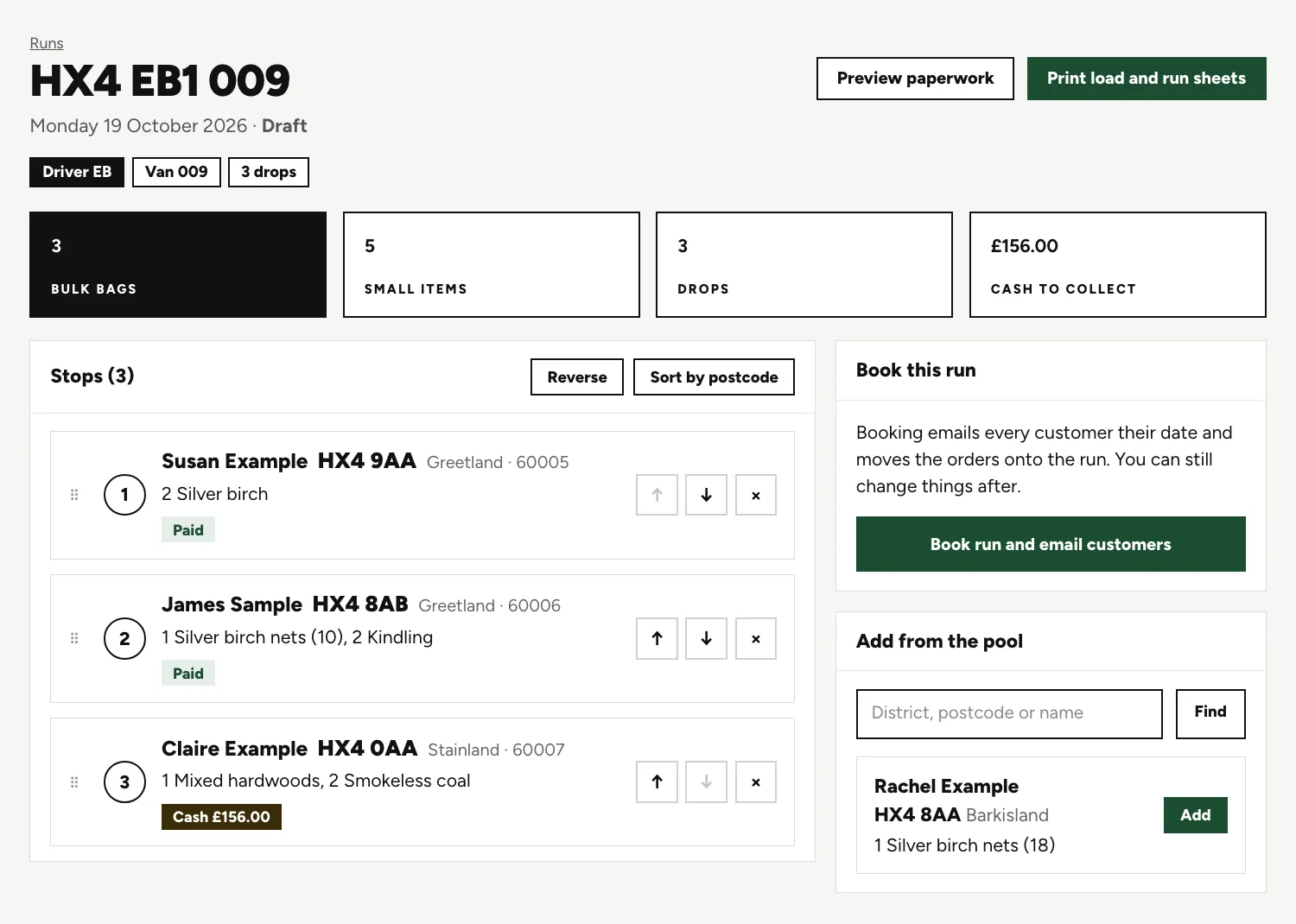
A draft run on screen.
The run code
HX4 EB1 009 carries the area, the driver's initials with the trip number, and the van. Nobody types it.
Four boxes
The load in bags and small items, the number of drops and the cash to collect, adding up as stops go on.
The stops
Each has a number, name, postcode, village, what is on it, a Paid or Cash badge, and up, down and remove buttons.
Book this run
One button books the run and emails customers. An Add from the pool panel catches stragglers.
What a run keeps track of for you.
Every run keeps track of these without being asked.
Running totals
By product, plus drops and cash to collect, so you know the load before anyone lifts a bag.
Warnings on stops
A stop is flagged when the customer can't take that weekday, when their earliest date is after the run date, when the order is unpaid, when the customer has a warning, or when they asked for a call first.
A calls list
Customers with no email go on a printable list with their phone numbers, and you mark each one called.
Copy a run
A regular round can be copied into a new draft with the same area label and driver.
Delivery times, if you want them.
Time windows are optional. Give a stop a one-hour slot, save the times, then use the send times button to tell customers.

From and to boxes
One row per stop. Fill in the ones that matter.
Not saved, in red
Two stops have times that aren't kept yet. Save times keeps them.
The load by product
The panel on the right counts what is on the van, product by product.
Extras we can add for your yard.
Neither of these comes as standard. If you want one, we can add it for your yard.
A route planner for drivers Extra
A view of the run for the driver, stop by stop, with directions to the next drop. Until then, paper and the driver's own maps do the job.
Text messages to customers Extra
The delivery day, the delivery window and an 'on our way' message, to go beside the emails.
Questions people ask.
Does LogRun work out the quickest order for my stops?
No. You order the stops, by dragging or by sorting by postcode. A postcode sort puts neighbours together, which is a good start, but it isn't a calculated shortest route.
Can my driver follow the run on a phone?
Not as LogRun stands. There are no driver logins and no map of where the van is. The driver takes a paper run sheet and uses their own sat nav. A route planner for drivers is one of the extras we can add.
Is a postcode a good way to group deliveries?
Mostly. Neighbours share a district, so it suits a town round. In the country a postcode can straddle a hill or a river, which is why the office can drag any stop to where it makes sense.
What if a customer can't take the day of the run?
The stop shows a warning, because that weekday is on their list of days to avoid. Take the stop off with its remove button and put the order on a better run.
What about customers with no email address?
They go on a calls list, with the phone number beside each name. You ring them with their day and mark each one called.
Can I repeat a regular round every week?
Yes. Copy run makes a draft with the same area label and driver, and you add the new orders from the pool.
Keep reading.
Want to see it run on your yard?
Tell us how you take orders and run your deliveries today. We'll show you LogRun working on a yard like yours, and tell you honestly if it isn't the right fit.