Firewood business software for everything behind the van.
Firewood business software for the side of a yard nobody sees from the road: customers, stock, offers, vouchers, invoices and staff. An honest tour, including what it isn't.
The van is the loud part. This is the quiet part.
Firewood business software has to do more than plan a run. Behind every drop sit a customer record, a stock figure, perhaps a discount code, a voucher somebody bought for their dad, and an invoice for a pub on account.
This page tours that side of LogRun, which is log merchant software for the whole desk and not just the van. It isn't an accounting package, and a later section says exactly where the line falls.
An example (invented, not a real yard)
Monday, eight o'clock, one cup of tea.
Hannah opens the office door and then the Today page. Eleven orders are waiting in the pool, one is parked, and two web orders are still awaiting payment, so she leaves those alone.
A pub on account has three orders from last week. On its customer page she ticks them and raises one invoice, then emails it.
Sunita rings to ask whether her order confirmation went out. Hannah finds it in the outbox, sees the address it went to and reads it back. Low stock shows one item, so she checks the figure before taking another order for it.
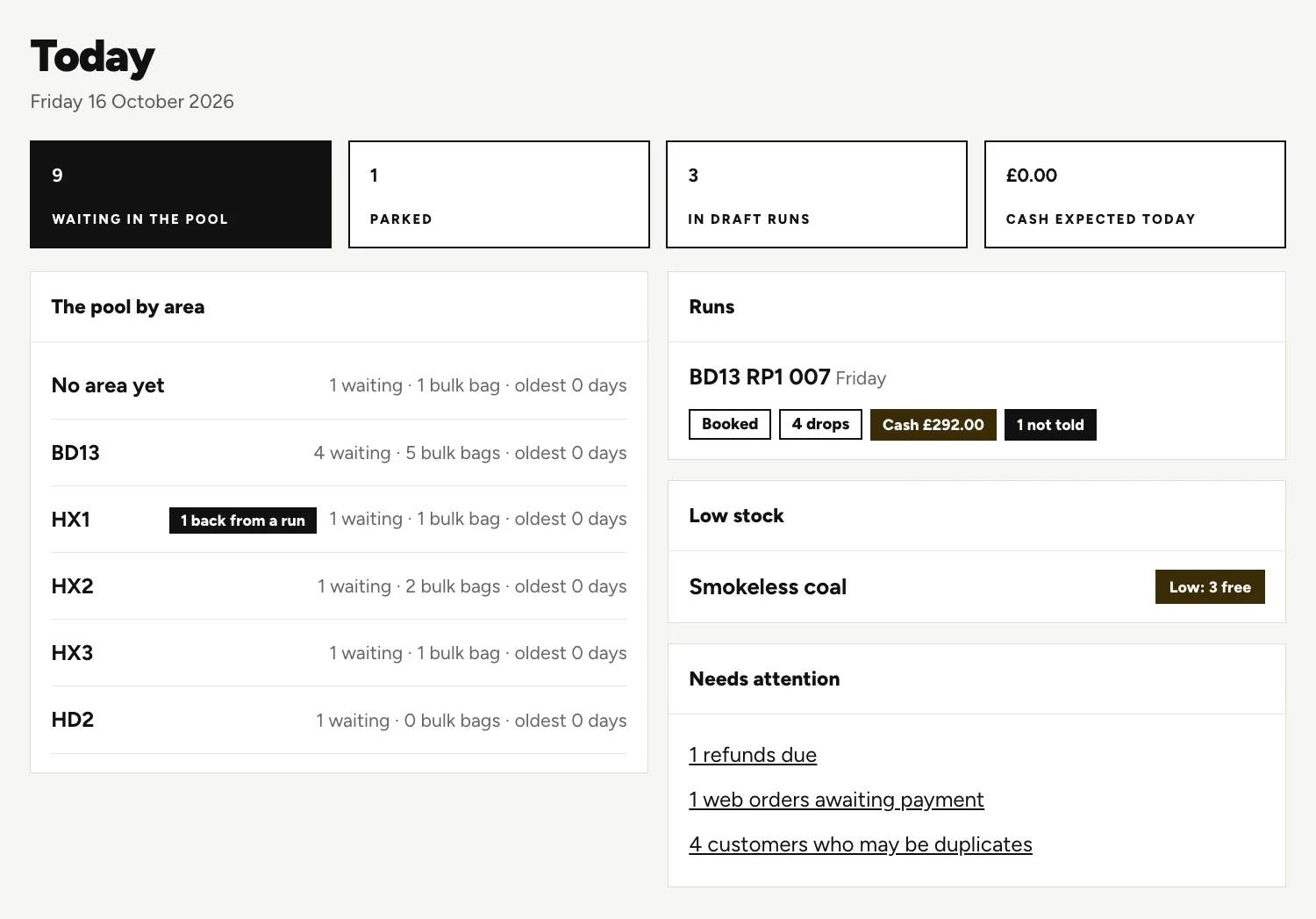
That Today page, up close.
It's the first thing the office sees, and it points at what needs a human.
The boxes
Orders in the pool, parked orders, runs still in draft, and the cash expected today.
Runs and low stock
A booked run is listed under Runs. A product running low shows under Low stock.
Needs attention
Refunds due, web orders awaiting payment and customers who may be duplicates wait here until someone deals with them.
What the office keeps behind the deliveries.
The whole desk needs covering, so here's the short version of each part.
Customer records
More than one phone, email and address each, notes with history, every past order, and a black warning bar for cautions such as a loose dog.
Stock
A figure for each product, adjusted when a delivery comes in from the kiln, plus stock takes and a switch for out of stock.
Offers and discount codes
A set price on one product when another is bought, multi-buy, a basket discount or a free add-on. Codes can carry limits.
Gift vouchers
Bought in the shop for now or for a later date, spent online or on a phone order, with a page where the holder checks what is left.
Price groups and accounts
Special price groups, such as pub or wholesale, and account customers who are invoiced instead of paying at the door.
Invoices
PDFs in their own number series, emailed to the customer and marked paid when the money arrives.
Where the accounts package fits.
LogRun makes the invoice. It doesn't post it anywhere. If you want the figures in your accounts package, you enter them there, as you do now.
We'd rather say that here than have you find out in week one.
Who signs in, and what they can see.
Staff sign in by an emailed link, so nobody shares a password on a sticky note. Each person has a role, owner, office or marketing, and the role sets what they can see.
Three more things sit beside the roles:
- The activity log records what was done in the system.
- The outbox shows every email LogRun has sent, so you can see what a customer was told.
- The office help guide comes as pages, slides or an A4 printout, with screenshots.
Questions people ask.
Is this firewood business management software or an accounting package?
It manages the business side of selling and delivering firewood. It isn't an accounting package. It makes invoices as PDFs and lets you mark them paid, but it sends nothing to your accounts package, so the books stay where they are.
What kinds of offers and discount codes can I run?
You can set a price on one product that applies when a customer buys another, or run a multi-buy, a basket discount or a free add-on. Codes can carry limits. Phone orders show an offer too, with a prompt to add another bag.
How do gift vouchers work?
A customer buys one in the shop, and it's sent straight away or on a date they choose. The voucher can then be spent in the online shop, or on an order taken by phone. The holder can look up the balance on its own page.
Can I control what my staff see?
Each person has a role, owner, office or marketing, and the role sets what they see. Ask us what each role can open when you book a demo.
A customer says they never got an email. How do I check?
Open the outbox. It lists every email LogRun has sent, so you can see what went out and which address it went to. If the address was wrong, the customer's record is where you put it right.
Is there a guide for a new person in the office?
Yes. LogRun has an office help guide, as pages, slides or an A4 printout, with screenshots. A new starter can read it at their own pace.
Keep reading.
Want to see it run on your yard?
Tell us how you take orders and run your deliveries today. We'll show you LogRun working on a yard like yours, and tell you honestly if it isn't the right fit.